


Table of Contents
- Introduction
- How AI Tools Are Changing Content Production
- Brand Voice, Tone, and Messaging
- Use the Blog Author
- Optimize the Blog Author’s Page
- Include Industry Data and References
- Include Your Own Company’s Research Data
- Add More Illustrations, Tables, Charts, and Graphs
- Add Use Cases and Case Studies
- Add Quotes from Industry Leaders
- Add Quotes from Your Company Executives
- Add Quotes from Subject Matter Experts
- Add Multiple Photos
Introduction
For many companies, content planning has changed as the workforce, budgets, website capabilities, the introduction of AI generative tools, and business dynamics have shifted over the last couple of years. With these fluctuations, marketing and content strategies must similarly adapt and evolve. We see this with our clients and what they plan to publish on their sites this year—whether it’s an increase in content volume, a foray into new areas, or an increased focus around specific topics and products.
SEO consultants and agencies are accustomed to constant alterations—but these new dynamics increase competitive pressure as many companies make significant adjustments to their sites. I chatted with Mark Jackson, the president and CEO of Vizion Interactive, to get his thoughts on this topic. He had this to say:
“One truth about search engine optimization is that the field is constantly evolving. Perhaps years ago, quantity of content—and things like ‘the number of times a keyword is mentioned’—mattered the most. Nowadays, Google is in search of the highest–quality content to surface in its search results which best matches with a searcher’s intent. For this reason, we must craft high-quality content—authored by sources who know the topic well—which is truly resourceful and helpful for the reader.”
This insight aligns with research from a recent survey by the Content Marketing Institute, which concluded that the top five goals for content performance are as follows:
- Create brand awareness
- Build credibility/trust
- Educate audiences
- Build loyalty with existing clients/customers
- Generate demand/leads
So, how do we address these items while also appealing to Google algorithms to gain solid rankings? The first step is to choose high-demand topics on which you are able to demonstrate your authority as a thought leader. Then, focus on the substance and format of the content and how your message will be conveyed.
The content strategy of many companies has been the following:
- Choose a keyword with a high search volume
- Write a 500-word blog post
- Find a hero image from a stock photography site
- Hit the publish button
- Share on organic social channels
There’s often little thought given to the format and style of a post, its supporting content, or other items that could be included to make it valuable or of high quality.
In December, Google made changes to its algorithms specifically targeted towards review sites whose writers often have obviously never used the products under review. Yet these writers create blog posts like “Top 10 {product} for 2022” including in them multiple Amazon affiliate links. The prices aren’t shown, of course, ensuring that users click the links provided to view the products’ costs and reward the “review” site with an affiliate link cookie on Amazon.
In Google’s blog post discussing this update, it provides a link to a post outlining its best practices for reviews, as listed below:
- Evaluate the product from a user’s perspective.
- Demonstrate that you are an expert regarding the products reviewed.
- Provide evidence such as visuals, audio, or other links of your own experience with the product to support your expertise and reinforce the authenticity of your review.
- Share quantitative measurements about how a product measures up in various categories of performance.
- Explain what sets a product apart from its competitors.
- Cover comparable products to consider or explain which products might be best for certain uses or circumstances.
- Discuss the benefits and drawbacks of a particular product based on your own original research.
- Describe how a product has evolved from previous models or releases to provide improvements, address issues, or otherwise help users in making a purchase decision.
- Identify key decision-making factors for the product’s category and how the product performs in those areas. (For example, a car review might determine that fuel economy, safety, and handling are key decision-making factors and rate performance in those areas.)
- Describe key choices in how a product has been designed and the effect on users beyond what the manufacturer says.
- Include links to other useful resources (your own or from other sites) to help a reader make a decision.
- Consider including links to multiple sellers to give the reader the option to purchase from their merchant of choice.
I found this quite fascinating. It’s not a stretch to think that Google could apply some of these language processing techniques to the plethora of 500-word blog posts out there. We already know sites that fall into what’s known as the “Your Money Your Life” category are held to a higher standard. However, if your site does not naturally fall into one of the subsets of this category—like health care, finance, or insurance—you should still understand that the foundation of how Google analyzes content will likely be applied to other content sets.
How AI Tools Are Changing Content Production
Using Generative AI tools
ChatGPT and Bard and many other AI tools have generated a lot of interest recently and there’s an increasing number of AI tools available for people to use to generate content. When using these tools to generate text content, it’s important to understand how the Large Language Models (LLM) work and therefore their limitations.
At a high level, the LLM takes content from a massive set of documents (web pages) and runs through a learning process to understand how words and concepts relate to each other. Once the learning process is complete, the AI tool can be queried, and it will generate a response based on what it has learned from the original set of documents. In the case of ChatGPT it based its documents from webpages up to September 2021.
The LLM is usually fixed at that point in time, so it won’t always be able to reference events or concepts that occurred after that, here’s an example from ChatGPT:

AI tools may also ‘hallucinate‘ and generate odd responses or even fabricate information that they present as being factual. One such example was a lawyer who was fined for submitting documents generated by ChatGPT, which included 6 references to fictitious legal cases.
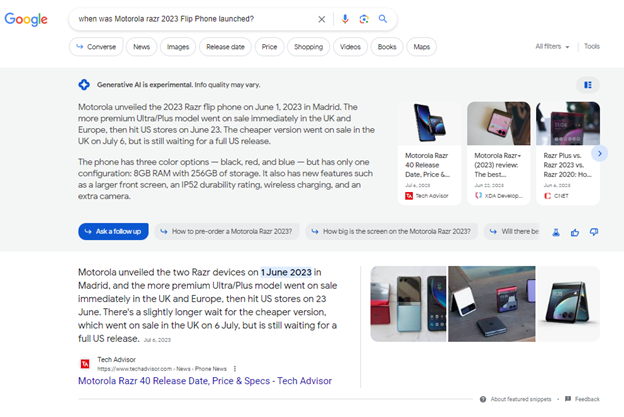
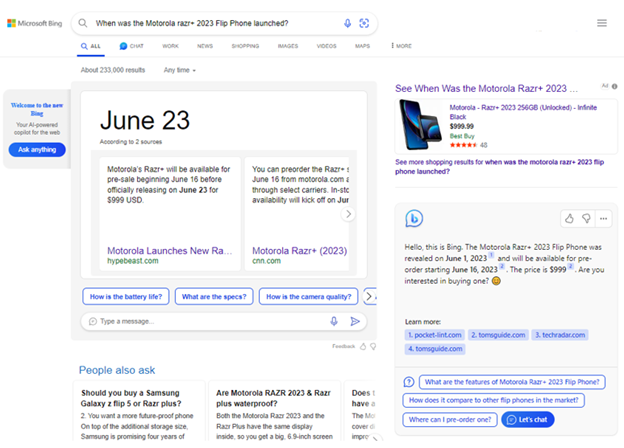
However, there’s good news for marketers. Bard and Bing have both figured out ways to ingest new brands, services, and products into their responses. Below is an example for the Motorola Razr Flip Phone that was released in June 2023:
Bard:
ChatGPT:
These AI tools can generate text and short articles based on how you craft the prompt and are a great way to get started. I also use these tools when I’m experiencing writer’s block, to get me over the hump and give me another idea I can latch onto and run with. But the output should always be edited, as I’ve found some common pitfalls and issues with the AI generated articles:
Brand Voice, Tone, and Messaging
AI tools didn’t read your company’s brand guidelines before generating the output, so they have no way to know what is suitable language to use for your company’s brand voice and tone.
The marketing strategy will also have a brief about messaging and provide guidelines on reasons to believe (RTB), messaging, positioning, target audience etc. These all need to be considered and incorporated into the final document. This is not a trivial process and can take a fair amount of time.
When reflecting on my usage of these tools I think they do offer a lot of benefits, but much of the conversation around them has been cost center focused. Some publications have even let go of writers to save labor costs. Many companies exploring these tools will likely have the same mindset of wanting to save costs to increase margin/profitability, but that’s not the only way.
The first approach is to use these AI tools to produce content more quickly, thus reducing the cost per article. However, the second approach is to use the same time to generate the article, but make it better quality, so it provides more value, generates more traffic, social shares, and links.
If we create a matrix with the axes of Production Time and Content Yield, that is, the benefits that the content can produce for you, whether that’s page views, leads, sales, shares, links, or other measurable outcomes, we can see how various pieces of content fall in the matrix.
The belief behind AI generative tools is to try and move into the bottom right quadrant, where you can generate a prompt and the AI tool will quickly generate a high-quality article.
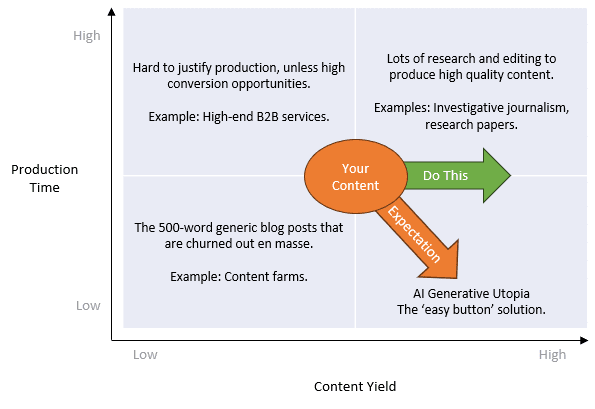
In my experience this rarely works, so I would challenge you to think about the AI tools in a different way. Instead of focusing on lowering production costs, reinvest the time you’ve gained back into the article to improve the quality and increase the yield.
Below are the top 10 ways you can improve the overall quality of your content, appeal to Google’s content quality algorithms and provide more value to your readers.
1) Use the Blog Author
Recently, Google has made several algorithm updates that evaluate the quality, authenticity, and trustworthiness of content. However, Google isn’t just evaluating the words on a page—it’s also looking at content from a higher level, trying to understand who the authors are and what other content they have written, linking it all together in its knowledge graph.
Vizion recommends following these guidelines:
- Use a real person as the author of your content. Choose someone with a public persona and an existing social media or digital footprint. Most important, pick someone who is qualified or recognized in their field as a leader or SME. The ideal author will already have a bio or profile page on the website along with multiple public social profiles on sites like LinkedIn, Twitter, or Facebook.
- WordPress has an author feature pre-built into its platform, so use it to the fullest by filling out as many fields as possible.
- In the author’s bio, include a summary of their qualifications, experience, and any awards or recognition they have received. If they have profile pages on other sites that will help support their expertise or experience, such as industry association or membership pages, cite those, too, and provide links. Include links to any recent news articles where the author is quoted or mentioned, even if it doesn’t link directly to your site.
- On the article pages, ensure that the author’s name appears either at the top or the bottom of the article and that it links to their author page.
2) Optimize the Blog Author’s Page
WordPress usually populates this page with the bio information and other fields that you entered for that user in the dashboard. However, if you’re not using WordPress, you’ll need to manually add the information within your Content Management System (CMS).
Ensure that the author’s social profiles are listed and linked. This will help the author generate a following, which can also be leveraged as an audience notification mechanism as new content is published.
Including other information such as hobbies, interests, or charity work is a great way to add a flare of personality. However, from an SEO perspective, this content is secondary to building trust by highlighting the author’s qualifications and expertise.
3) Include Industry Data and References
Include third-party data or references that support the subject of the article. Short paragraphs can be quoted from various sources with the inclusion of a link to the original source without fear of duplicate content issues. Suitable third-party sources include popular news, industry associations, university research, government sites, or other industry-recognized organizations.
4) Include Your Own Company’s Research Data
Use your company’s own data and contrast it with industry data to generate insights that can show how your company’s offerings outpace the competition or provide more value.
5) Add More Illustrations, Tables, Charts, and Graphs
This goes hand in hand with the above 2 points. Including supporting visuals helps keep the reader engaged and allows them to better visualize and conceptualize the scale and quantity of the data being presented.
6) Add Use Cases and Case Studies
Along with the previous data points, include real world examples of how you’ve helped customers overcome problems, or how your solutions are suitable for specific industries. Explain how your products or services can be customized for specific industries or situations. How hard you want to push the sales angle is going to be up to your editorial discretion, but providing competitive examples can be a powerful way to demonstrate success and help potential customers understand how you can help them.
7) Add Quotes from Industry Leaders
Demonstrate that your content has buy-in from the leaders and experts within your field, suppliers, vendors, or other related associations. Include a quote modeled after a press release; these will provide additional context or supporting viewpoints. When mentioning the contributor, provide a link to their public profile. Ideally, they will have a profile page on their organization’s website, but if not, consider linking their LinkedIn or other relevant/professional social media page. The benefits of taking these steps are as follows:
- Ensuring additional unique content
- Demonstrating trust by showing connections with other people
- Allowing those mentioned or quoted to share or retweet the article, helping promote it by leveraging their own network
When looking for outside contributors, be sure to research their social media presence. If they are active on social networks, review their activity to see how often they’re quoted and whether they reshare or retweet the interviews or articles in which they’ve been quoted.
8) Add Quotes from Your Company Executives
If the blog post is important enough, you may be able to get a quote from the C suite within your organization. Note that you will need to reach out to their assistant or PR team well ahead of the publication schedule as it may take some time to get a quote back. But having a quote from them shows involvement at the highest levels and shows commitment to the reader.
9) Add Quotes from Subject Matter Experts
Consider reaching out to your own Subject Matter Experts (SMEs), like a department head, or a product lead, as they can sometimes offer insights that may be more relatable to users of the product or service.
10) Add Multiple Photos
Adding multiple photos makes the article much more engaging, especially when the photos are obviously from the same photoshoot. Sometimes these will even give you additional ideas for content, for example a detailed photo of a specific feature gives you the opportunity to talk about that. An environmental shot naturally leads you to write about use cases and how your product or service solves a specific problem.